Find broken links. Check your SEO.
Fix issues with confidence.
TheUrlInsights is a Chrome extension that checks links, redirects, page resources, and on-page SEO. Review the page you are viewing or run a Full Site Scan to find issues across your website.
Check links and review SEO findings directly in your browser.

Find website issues before they become harder to track down
A broken link, missing image, or indexing problem can be easy to overlook during everyday website work. Manually checking each URL takes time, and some issues are not obvious from the page itself.
TheUrlInsights brings link checking and on-page SEO checks together in one place, helping you identify problems and investigate them without switching between multiple tools.
Find broken links
Identify links that return errors, missing resources, and URLs that may need attention.
Understand redirects
Review redirect chains, redirected URLs, and other link warnings to decide whether a URL needs updating.
Review indexing signals
Check robots directives, canonical URLs, sitemap coverage, and other signals that can affect how search engines access a page.
Inspect on-page SEO
Review titles, descriptions, headings, image alt text, structured data, and social-sharing metadata.
Everything you need to inspect a page
Broken Link Checker
Check links on the page you have open in Chrome. See working links, broken links, redirects, and warnings in a results table.
- Highlight links on the page by status.
- Filter and search results.
- Open individual results for more detail.
- Recheck URLs and locate the relevant page element.
- Export visible results to CSV or copy them as JSON.
On-Page SEO Audit
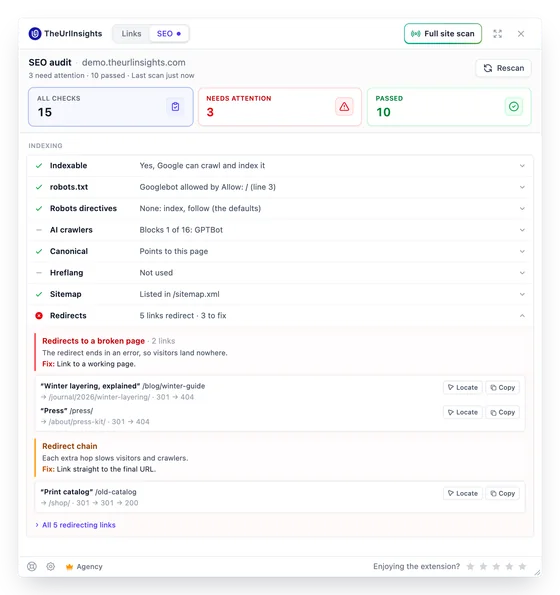
Review common indexing, content, and markup issues with the SEO tab.
-
Check robots.txt directives and
noindexsignals. - Review canonical URLs and sitemap coverage.
- Inspect page titles and meta descriptions.
- Review heading structure and image alt text.
- Check structured data, language settings, and social-sharing metadata.
- Read explanations of findings and guidance on what to investigate next.
Redirect and Resource Checker
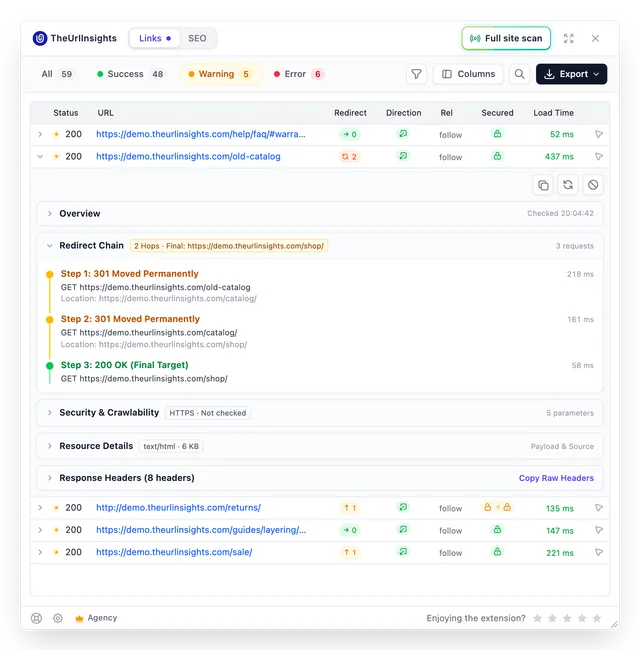
Understand what happens when a link or resource is requested.
- Inspect redirect chains and HTTP response information.
- Identify missing images and other resource problems.
- Review response headers, timing, and resource details.
- Investigate possible soft 404s, missing anchors, and mixed content.
A warning does not always mean a link is broken. Open its details to understand what the checker found.
Explore Link Details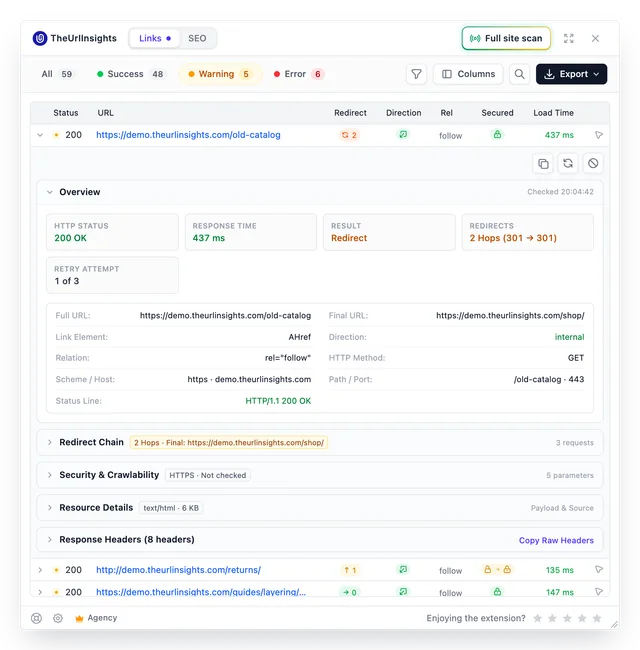
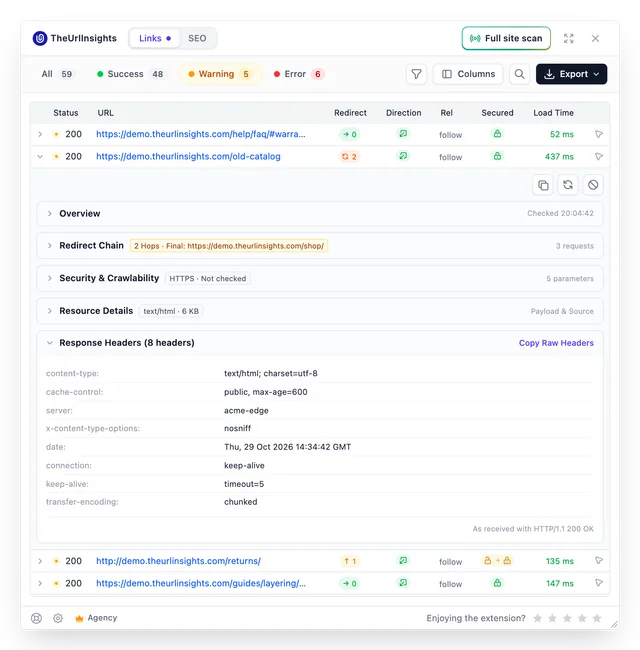
Full Site Scan
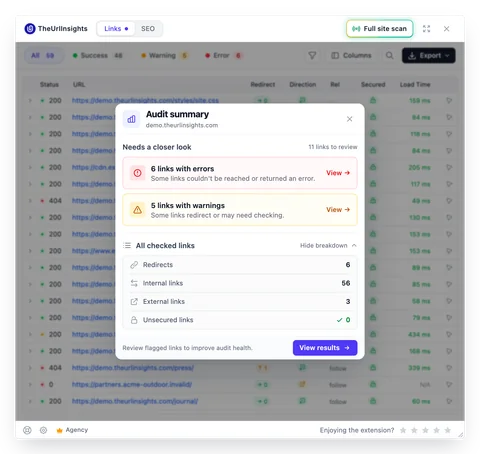
Move beyond the page you are viewing. Run a Full Site Scan to discover links across the pages included in the scan and identify where issues occur.
Explore Full Site Scan- Review broken links, redirects, warnings, and other issues.
- See which pages contain problem links.
- Use scan filters and exclusion rules to focus the scan.
- Review previous scans in History.
- Export scan data and generate PDF reports, depending on your plan.
Scan limits depend on your plan. A scan may stop when it reaches its configured page limit or another stopping condition, so check the report to understand its coverage.
Check a page in three steps
-
Open a webpage
Navigate to the page you want to inspect in Chrome and open TheUrlInsights from the toolbar.
-
Run your checks
Use the Links tab to check URLs and resources, or open the SEO tab to review indexing, content, and markup.
-
Review and investigate findings
Filter the results, open individual issues, locate the relevant elements, and export the information you need for your workflow.
Need to check more than one page? Start a Full Site Scan to review links across the pages included in the scan.
Add to ChromeSee where broken links occur across your website
Finding a broken URL is only part of the job. You also need to know which pages contain it and what to fix first.
Full Site Scan helps you review link issues across the pages it scans. Its report brings together scan coverage, link status, issue types, affected pages, and sample broken links.
 TheUrlInsights · Full site scan · demo.theurlinsights.com
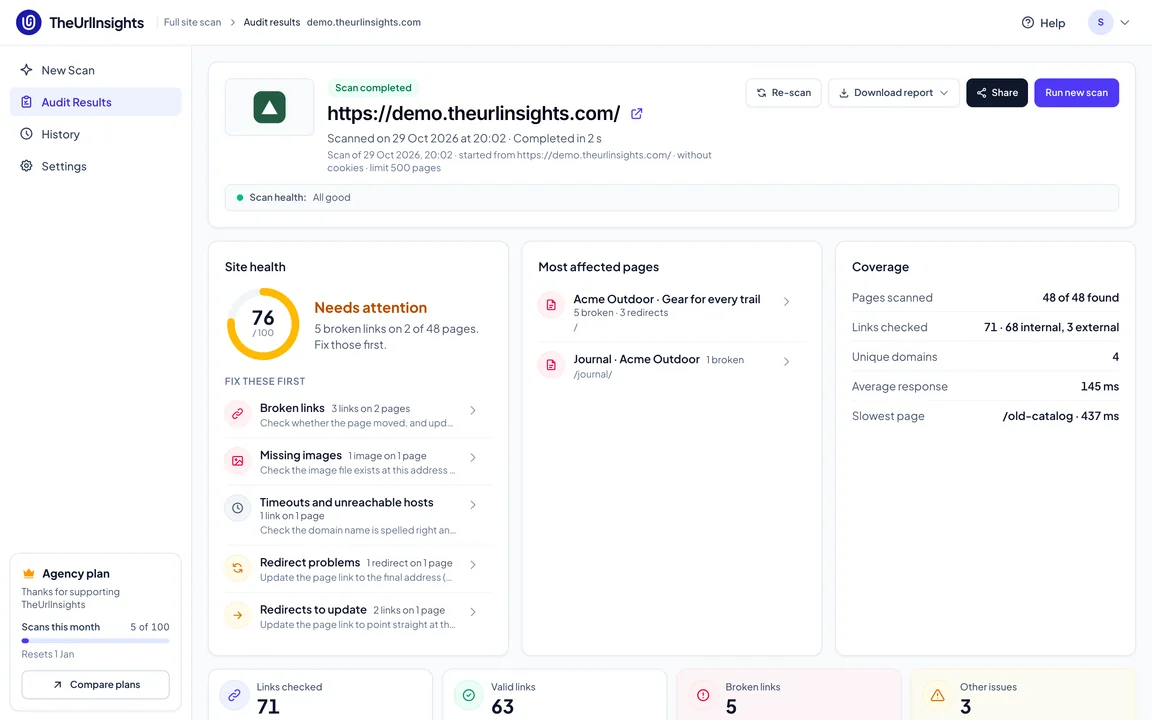
Use the report to:
- Identify pages with the most issues.
- Review broken links and other findings by type.
- Understand how many pages and resources were checked.
- Prioritize fixes using the issue counts and details.
- Share scan findings through available report formats.
The number of pages scanned and the report features available depend on your plan. Review the scan status to see whether the scan completed or stopped early.
View PlansOne tool for the people who maintain websites
SEO specialists
Review technical SEO signals, investigate broken links, and check redirects while working through a page.
Developers and QA testers
Check links and resources after releases, content changes, or website updates. Investigate response information when something does not work as expected.
Content editors
Review article links, images, headings, and metadata before or after publishing content.
Website owners and digital teams
Run routine checks, review Full Site Scan reports, and keep track of issues that need attention.
Check pages without sending their content to TheUrlInsights
Link checks run from your browser directly to the websites and resources being checked. TheUrlInsights does not route these checking requests through its own server, and the page HTML used for checks is not uploaded to TheUrlInsights.
The extension does not send your browser's cookies with checking requests. Pages that require a logged-in session may therefore return an authentication-required result.
The extension also processes account information and, when enabled, usage analytics. You can turn off Share usage analytics in Settings.
Read our Privacy Policy to learn more about the information handled by the extension and its services.
Start with page checks. Choose a plan for larger scans.
Every plan includes the link and SEO checks in the extension panel. Plans differ in Full Site Scan limits and selected reporting and exclusion features.
Free
$0
- Link and SEO checks in the extension panel
- CSV export and JSON copy
- 3 Full Site Scans per month
- Up to 100 pages per scan
- Summary PDF report
- Last five scans in History
Pro
$9 /month
or $90/year
- Everything in Free
- 30 Full Site Scans per month
- Up to 10,000 pages per scan
- Full PDF report
- Advanced scan exclusion rules
- Last five scans in History
Agency
$29 /month
or $290/year
- Everything in Pro
- 100 Full Site Scans per month
- Up to 10,000 pages per scan
- Full PDF report
- Advanced scan exclusion rules
- Last five scans in History
Lifetime Pro
$149 one time
- Pro features included at purchase
- 30 Full Site Scans per month
- Up to 10,000 pages per scan
- Full PDF report
- Advanced scan exclusion rules
- Last five scans in History
New accounts start with a 14-day Pro trial and then move to Free. Plan features and limits are subject to the current pricing page and checkout terms. Lifetime access applies for the supported product lifetime, not the lifetime of the buyer.
Frequently Asked Questions
What is TheUrlInsights?
How do I check for broken links?
Can TheUrlInsights check an entire website?
Does TheUrlInsights check redirects?
Can I use it for SEO audits?
Can I export the results?
Does TheUrlInsights upload the pages I check?
Is TheUrlInsights free?
Find the issues. Understand the results. Take the next step.
Check broken links, review redirects, and audit on-page SEO with TheUrlInsights in Chrome.
Start with the page you are viewing, then run a Full Site Scan when you need to check more pages.