
AI Crawler Checker
Check How AI Crawlers Access Your Website
The SEO tab reads the site's robots.txt, the file that tells crawlers where they may go, as each of 16 AI crawlers would. It shows which are allowed and which are blocked, judged by the policy you choose.
On by default, on every plan.
Three kinds of AI crawler
AI crawlers fetch pages for different reasons, so blocking each kind means something different.
-
AI training
Collect pages to train AI models. Blocking them asks that your pages not be used for training. Google-Extended and Applebot-Extended don't crawl at all. They're names in robots.txt that Google and Apple read before using pages from their usual crawlers to train AI models.
-
AI search
Index pages for AI search features. Blocking them can keep your pages out of those features' results.
-
Fetches for a user
Fetch a page when someone asks an AI assistant about it. Blocking them stops those requests to your site.
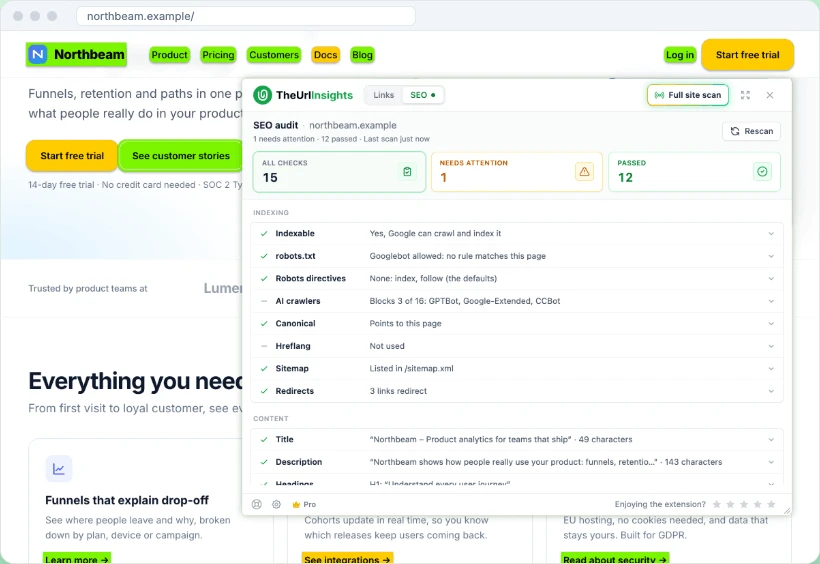
The 16 crawlers it checks
All 16 are chosen by default. In Settings you can leave any of them out.
| Crawler | Company | What it fetches for |
|---|---|---|
| GPTBot | OpenAI | AI training |
| ClaudeBot | Anthropic | AI training |
| Google-Extended | AI training | |
| Meta-ExternalAgent | Meta | AI training |
| Applebot-Extended | Apple | AI training |
| Amazonbot | Amazon | AI training |
| Bytespider | ByteDance | AI training |
| CCBot | Common Crawl | AI training |
| OAI-SearchBot | OpenAI | AI search |
| Claude-SearchBot | Anthropic | AI search |
| PerplexityBot | Perplexity | AI search |
| Applebot | Apple | AI search |
| ChatGPT-User | OpenAI | Fetches for a user |
| Claude-User | Anthropic | Fetches for a user |
| Perplexity-User | Perplexity | Fetches for a user |
| Meta-ExternalFetcher | Meta | Fetches for a user |
Choose a policy
The policy decides what counts as a warning. Choose it in Settings, under SEO and AI crawlers.
| Policy | What it warns about |
|---|---|
| Just report (the default) | Nothing. It lists which AI crawlers are blocked without judging them, and the check shows a grey dash. |
| Allow AI | Any AI crawler that robots.txt blocks. |
| Block AI training | Any training crawler that robots.txt allows. Search and user fetchers are left alone. |
| Block all AI | Any AI crawler that robots.txt allows. |
How robots.txt rules are matched
User-agent: *
Disallow: /private/

User-agent: GPTBot
Disallow: /
A crawler follows the most specific group that names it, and only that group. If
none names it, it follows *.
Here GPTBot has a group of its own, so it's blocked from the
whole site, and it doesn't read the * group at all.
ClaudeBot isn't named, so it follows *: it's allowed
everywhere except /private/. The checker shows each crawler's verdict
this way, one by one.
Limits worth knowing
- robots.txt is a request, not a lock. Well-behaved crawlers follow it, but it can't stop one that ignores it.
-
It applies to one host: the robots.txt on
www.example.comdoesn't covershop.example.com. - It reads robots.txt only. Blocks set up elsewhere, such as in a content delivery network (CDN) or a firewall, don't show here.
- The list of crawlers is the one in version 2.0.2 of the extension. New crawlers appear over time.
Common questions
Does blocking AI crawlers affect search engines?
Search engine crawlers such as Googlebot and Bingbot are checked separately, in the robots.txt and Indexable checks, and the AI policy doesn't judge them. Blocking Google-Extended, for example, is a separate rule from Googlebot.
Which policy should I choose?
It depends on what you want AI services to do with your pages. Just report lists the blocks without judging them. Choose Block AI training to be warned about training crawlers you still allow, or Allow AI to be warned about any you block.
Can I turn the AI crawler check off?
Yes. In Settings, under SEO, switch off Check AI crawlers. Your policy and chosen crawlers stay as they are for when you turn it back on.
Check the page you're on, then the whole site
Every link and SEO check in the panel is on every plan, Free included. New accounts start with a 14-day Pro trial.