
For Agencies
Faster Website Audits for Agencies
Check a prospect's page during a call, scan a client's whole site before you quote, and send a branded PDF report. The Agency plan keeps each client's sites and scans together, with shared access for your team.
100 Full Site Scans a month on Agency. See Agency pricing
The agency workflow: audit → report → fix → re-check
-
Audit
Open the panel on the client's key pages for a first look at links and on-page SEO. Then run a Full Site Scan of the whole site, linked to the client's site profile.
-
Report
Download the Full report (PDF) with your branding. Its Fix these first list is the priority order to agree with the client.
-
Fix
Turn each group into a task: the issue, the pages it's on, the fix, and who owns it. Developers can use the CSV for the full list of links.
-
Re-check
Run the scan again after the fixes, and compare it with the last one in the site's Scans tab.
Client onboarding audits with Full Site Scan
A new client's site is often unknown ground. A Full Site Scan reads it page by page and checks every link and resource, up to 10,000 pages a scan.
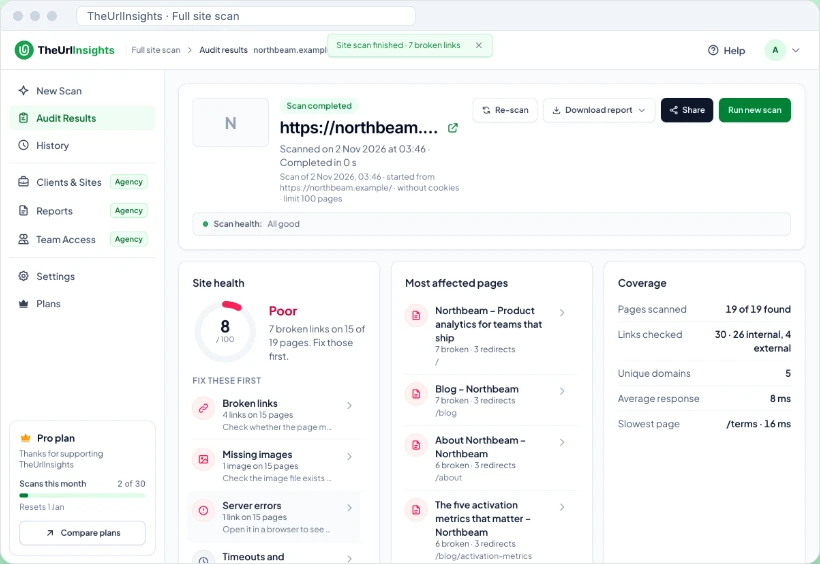
The report gives a health score, the most affected pages, and what to fix first. It's a fair, quick baseline to start the engagement with, and to show progress against later.
Before that, during a sales call, the panel gives a quick look at one page. Open it on the prospect's homepage to see its broken links and SEO findings in seconds.
Each client and site gets a profile in Clients & Sites, with its scan settings saved. Every scan linked to it keeps its summary, so the history stays with the client.
Shareable PDF reports
Every scan can be downloaded as a Summary report or a Full report, in PDF. Both are made in your browser, and nothing is uploaded. See what a Full Site Scan report contains.
A report the client can act on lists each issue with its impact, the fix, and who owns it. Fix these first gives you that order.
On Agency, a report template puts your logo, colours, title and company details on every PDF instead of ours. A live preview shows page 1 before you download.
QA after site launches and migrations
Launches and migrations are where links break: old addresses, changed paths, staging links left behind.
- Before launch: scan the staging site, and check key templates in the panel. The SEO tab flags a leftover noindex.
- After launch: scan the live site, and compare the issues with the staging scan.
- After a migration: trace the redirect chain from old addresses, and look for chains and loops. A redirect that ends in 404 is an error.
- On any page: the broken link checker gives every link a result in seconds, which suits a quick check after each fix.
Agency plan details (100 scans/month, 10,000 pages/scan)
Everything in Pro, plus the tools for client work. Prices and offers are on the pricing page.
| Agency | |
|---|---|
| Full Site Scans a month | 100, shared by the workspace |
| Pages a scan | Up to 10,000 |
| Summary and Full reports (PDF), CSV | ✓ |
| Branded PDF reports | ✓ Your logo, colours and company details |
| Client and site profiles | ✓ Each client's sites, settings and scan summaries |
| Team seats | 5, including yours, each with a role |
| Every link and SEO check in the panel | ✓ As on every plan |
| Can… | Owner | Admin | Editor | Viewer |
|---|---|---|---|---|
| See clients, sites, scan summaries and reports | All | All | Assigned clients | Assigned clients |
| Run scans on a site, download reports | ✓ | ✓ | ✓ | No |
| Add or edit clients and sites | ✓ | ✓ | Assigned clients | No |
| Edit report templates and branding | ✓ | ✓ | No | No |
| Invite, change roles, remove members | ✓ | ✓ (not the owner) | No | No |
| Billing, delete the workspace | ✓ | No | No | No |
Common questions
Do team members need their own paid plan?
No. Members use the workspace's scans, clients and report templates. Each one signs in with their own Google account.
Does client data leave my computer?
Scans run in your browser, and full results stay on the computer that ran them. Clients, sites and scan summaries are kept in your workspace, so your team sees the same ones.
Check the page you're on, then the whole site
Every link and SEO check in the panel is on every plan, Free included. New accounts start with a 14-day Pro trial.