
Check My Links alternative
A Check My Links Alternative with SEO Audits Built In
Check My Links is a popular Chrome extension for spotting broken links on a page. This page compares it with TheUrlInsights, feature by feature, from both extensions' current Chrome Web Store listings on 4 November 2026.
Quick comparison table (features, pricing, exports, site scan)
Facts about Check My Links come from its Chrome Web Store listing and its publisher's help pages, as of 4 November 2026. Extensions change, so check the listing before you decide.
| TheUrlInsights | Check My Links | |
|---|---|---|
| Links on the current page | Yes, with a result and a colour for each | Yes: green, red or yellow, with the status on hover |
| Images, scripts, stylesheets and media | Yes: 52 kinds of link | Its listing describes links only |
| Soft 404s and missing #anchors | Yes | Not mentioned in its listing |
| Redirect chains, hop by hop | Yes, with each hop's status, address and time | Marks redirects in yellow; no chain shown |
| On-page SEO checks | Yes: 15 checks, from noindex to Open Graph | Not mentioned in its listing |
| Whole-site scan | Yes: Full Site Scan, up to 10,000 pages on paid plans | No: one page or document at a time |
| Google Docs, Sheets and Excel files | No | Yes |
| Export | CSV download and JSON copy; PDF reports from a Full Site Scan | "Export All" to CSV; some export options are part of its paid key |
| Price | Free for every check in the panel. Paid plans (Pro, Agency and Lifetime Pro) add more and larger Full Site Scans | Free, with an optional one-time "Advanced Features Key", listed at about $29 |
| Account | A free account, to sign in once | Its listing doesn't mention one |
Where TheUrlInsights adds more (redirect chains, SEO tab, full site scan, reports)
-
Redirect chains
Every link is followed to its final address, and each hop is listed with its status, address and time. The redirect checker finds chains, loops and drops from HTTPS to HTTP.
-
The SEO tab
Beside the links, 15 checks cover noindex, robots.txt, canonicals, titles, headings, alt text and social tags. See the on-page SEO audit.
-
Full Site Scan
One scan checks the links on every page of a site, not one page at a time. Full Site Scan ends with a health score and a list of what to fix first.
-
Reports and exports
Export a page's results as CSV or JSON, with each link's redirect chain and headers. A Full Site Scan adds Summary and Full PDF reports.
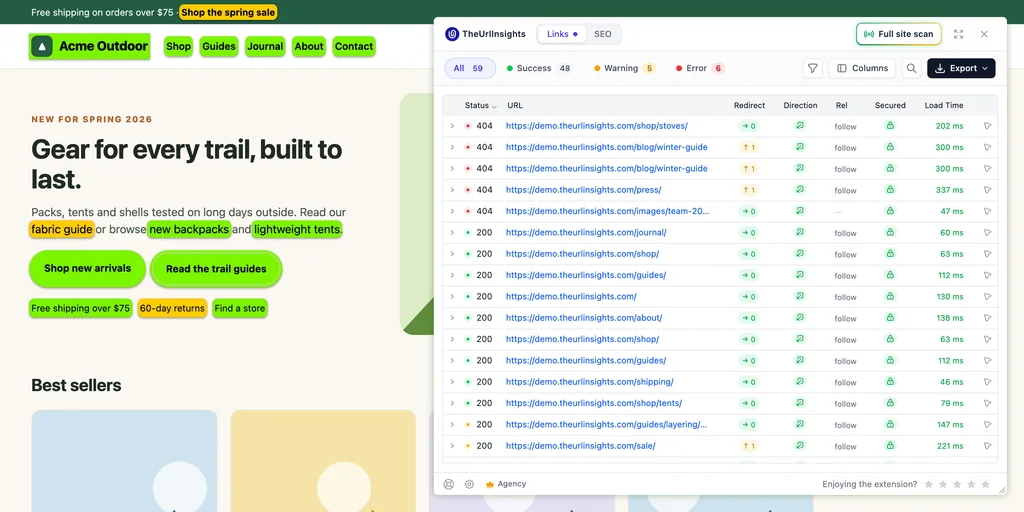
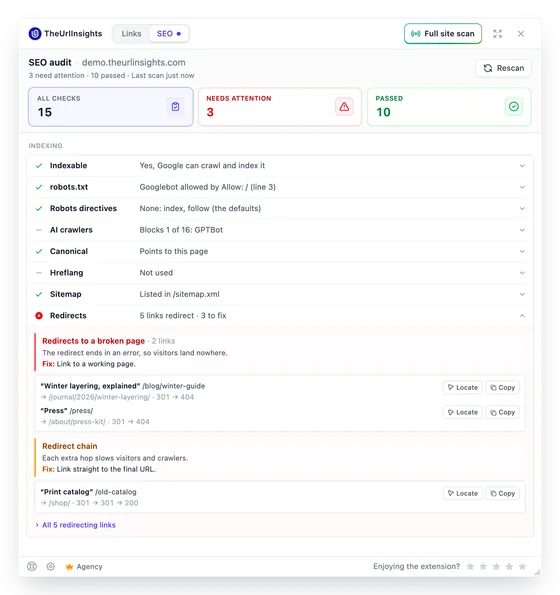
For one page, both extensions colour each link on the page. TheUrlInsights also checks images, scripts and stylesheets, and spots soft 404s and missing anchors; the broken link checker explains every result.
Where Check My Links may suit you better
An honest comparison names both sides. Check My Links may be the better choice if:
- You check documents, not only web pages. It can check the links in Google Docs, Google Sheets and Excel files. TheUrlInsights checks web pages only.
- You want the simplest possible tool. It highlights links in three colours and little else. TheUrlInsights shows more, which some people won't need.
- You'd rather not sign in. TheUrlInsights asks for a free account; Check My Links' listing doesn't mention one.
- You prefer a one-time payment for extras. Its optional key is a single payment. TheUrlInsights' paid plans are monthly or yearly, with a one-time Lifetime Pro.
Who should switch
- SEOs and site owners who check links and then open another extension for redirects or meta tags. Both are in one panel here.
- Anyone who checks many pages, such as after a redesign or a migration. A Full Site Scan saves opening each page.
- Agencies that send link reports to clients. PDF reports, with your branding on Agency, come straight from the scan.
- Not everyone. If you only check a few links in a doc now and then, Check My Links may be all you need.
- Comparing more extensions? The SEO Chrome extensions comparison puts nine side by side.
Common questions
Is Check My Links still available?
Yes. A Check My Links extension published by SelectorsHub is in the Chrome Web Store, updated in October 2026. Older guides may describe an earlier listing with different figures. This page uses the listing as it was on 4 November 2026.
Is TheUrlInsights free?
Yes. Every link and SEO check in the panel is free, with CSV and JSON export. The paid plans add more Full Site Scans and larger ones, and the Full PDF report; compare plans.
Can I use both extensions?
You can install both. Each colours the links on the page, so run one at a time to read its colours clearly.
Pricing
- Broken Link Checker Every link and resource on the page you're viewing, with what each result means. Learn more
- Full Site Scan Every page of a site checked, with a health score and PDF or CSV reports. Learn more
- Pricing Compare the plans: Full Site Scan limits, reports and the Agency tools. Learn more
Check the page you're on, then the whole site
Every link and SEO check in the panel is on every plan, Free included. New accounts start with a 14-day Pro trial.