
A page audit or a site scan?
There are two kinds of check, and a good audit uses both. A page-level audit looks closely at one address: its status, redirects, indexing signals, title, headings and links. A site scan follows links from page to page and finds problems spread across many pages.
Start with the pages that matter most, such as the homepage, top landing pages and pages that earn money. Then scan the site to find what you would never see one page at a time.
| Page-level audit | Site scan | |
|---|---|---|
| Looks at | One address, in depth | Many pages, found by following links |
| Good for | Key pages, a fix you just made, a new template | Broken links across the site, redirects, pages with the most issues |
| Misses | Problems on pages you didn't open | Detail that only shows when you read one page closely |
Before you start
- Decide what the audit is for. A launch check, a traffic drop and a yearly health check need different depth.
- List the key pages. Ten to twenty addresses is plenty for the page-level part.
- Get read access to Google Search Console. Google advises giving an outside auditor read access only, not full control (Google Search Central).
Step 1: Check that search engines can reach and index your key pages
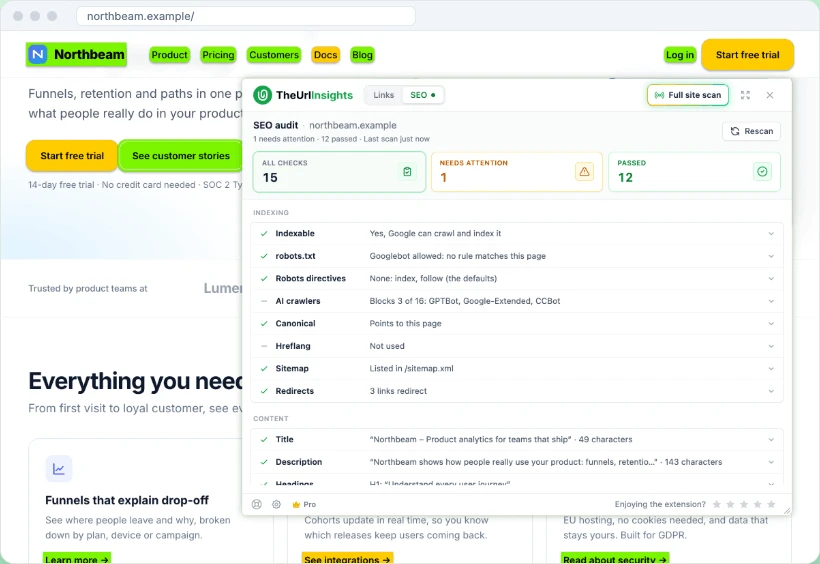
A page that can't be indexed can't appear in search, so check this first. Look at four
signals on each key page. First robots.txt, which tells crawlers where they may go.
Then any noindex tag or X-Robots-Tag header. Then the
canonical, the address the page names as its main version. And last, whether the page
loads without being signed in.
You can check whether a page can be indexed from the page itself. In Search Console, URL Inspection shows the version Google last indexed. Its live test doesn't cover canonical selection or sitemaps, and works only on sites you own (Search Console Help).
Step 2: Check links and redirects on each key page
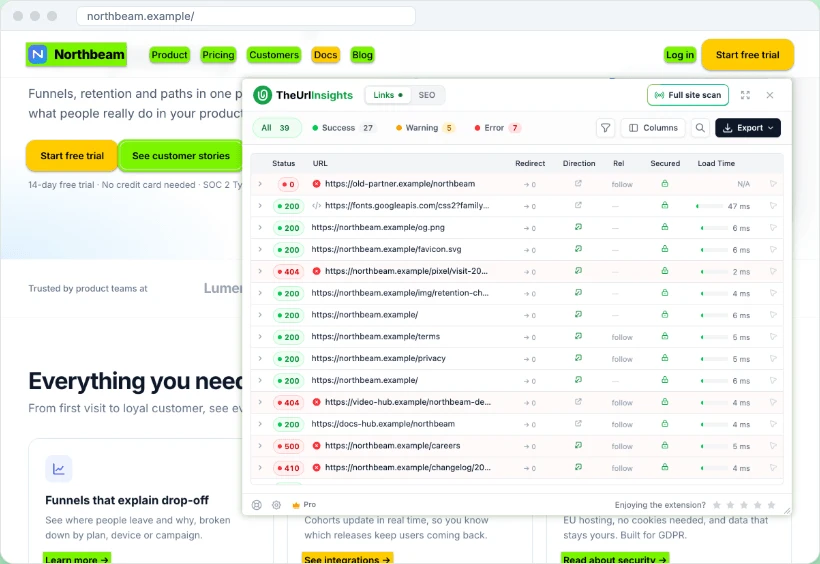
Next, check every link and resource on those pages: links, images, scripts and stylesheets. A failed request isn't always a broken page. A login, bot protection or a slow server can make a working link look broken, so open anything doubtful yourself.
Redirects deserve their own look. One redirect is often fine. A chain of several is slower for visitors and crawlers, and a redirect that ends in an error is a dead end. A broken link checker gives each link a result, and the redirect checker shows every hop.
Step 3: Review titles, descriptions, headings and images
These are what a search result and a shared link are built from. Each key page needs its own clear title, and a meta description that says why to click. It also needs one main heading (H1), and alt text on images that carry meaning.
You can check titles and meta descriptions on any page, and find images missing alt text the same way.
Step 4: Scan the whole site
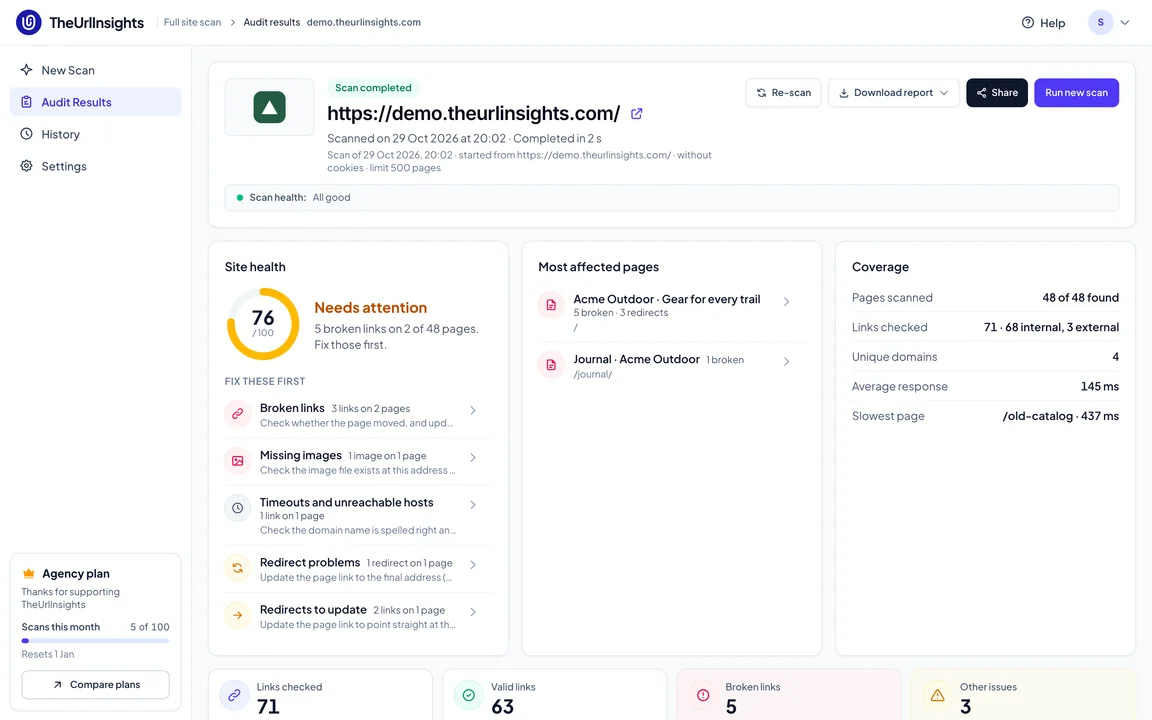
Now look beyond the key pages. A site scan reads the site page by page and checks every link it finds. It shows which pages have the most problems and which kind of problem is most common.
TheUrlInsights' Full Site Scan does this in a Chrome tab. The Free plan has 3 scans a month, of up to 100 pages. It checks links and resources, not the on-page SEO of every page, so keep Step 3 for your key pages.
Step 5: Check speed and the mobile experience
Run your key pages through PageSpeed Insights. Its field data comes from real Chrome visits over the last 28 days. A page passes Core Web Vitals when three measures are good. Largest Contentful Paint should be 2.5 seconds or less, and Interaction to Next Paint 200 milliseconds or less. Cumulative Layout Shift should be 0.1 or less (PageSpeed Insights documentation).
Google's Mobile-Friendly Test was retired in December 2023. Use Lighthouse, in Chrome's developer tools, for a mobile check instead.
Step 6: Put the findings in order
A long list of issues helps nobody. Sort them by impact and effort: indexing problems on key pages first, then broken links and redirect chains, then titles and descriptions, then smaller polish.
Write each finding with its evidence, such as the status code or the redirect hops, so whoever fixes it can see the problem. The SEO audit report template gives a structure, and the website audit report sample shows a finished one.
Step 7: Fix, then check again
After each round of fixes, check the same pages again and run the scan again. Compare the results with the first audit, so you can show what improved. A short website audit checklist keeps each repeat audit consistent.
Common questions
How do I audit a website?
Check that key pages can be indexed, then their links, redirects, titles and headings. Scan the whole site for broken links and redirects, check speed, and put the findings in order of impact.
How do I check an SEO audit someone gave me?
Pick a few findings and confirm them yourself: open the page, check the status code, the redirect hops or the canonical. A trustworthy audit gives evidence for each finding and realistic expectations, not promised rankings.
How long does a website audit take?
A page-level check of ten key pages can take an hour. A site scan depends on size: about 10 to 15 minutes per 1,000 pages with Full Site Scan. Writing up and prioritising often takes longest. See what a website audit costs when someone else does it.