
Meta Tag Checker
Meta Tag Checker for Chrome
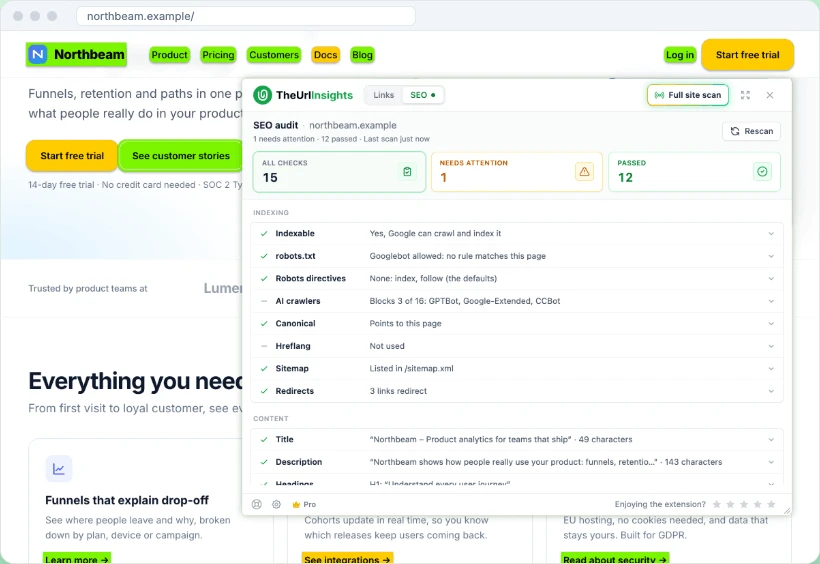
The SEO tab checks the meta tags of the page you're viewing: its title, meta description, Open Graph and Twitter card tags. Each finding says what's wrong and how to fix it.
On every plan, Free included.
Which meta tags matter for SEO (and which don't)
Meta tags are lines in a page's <head> that describe the page to
browsers, search engines and social networks. Visitors don't see them on the page.
| Tag | Matters? | Why |
|---|---|---|
<title>
|
Yes | Often the clickable headline in search results, and the tab name in the browser. |
<meta name="description">
|
Yes, for clicks | Often the snippet under the headline. It doesn't affect ranking directly, but a clear one earns clicks. |
<meta name="robots">
|
Yes | Can keep a page out of search (noindex). The noindex checker covers it. |
<link rel="canonical">
|
Yes | Names the main address among copies of a page. Duplicate titles often come with a missing canonical; the canonical tag checker covers it. |
| Open Graph and Twitter card tags | For sharing | Decide how a link looks on social networks and in chat apps. Not a ranking factor. |
<meta name="keywords">
|
No | Google has ignored it for years. Leaving it out is fine. |
Title tags – length, keywords, duplication
The Title check measures the <title> against 30–60 characters by
default. Over 60 is a warning, "May be cut off". Under 30 is a note. You can change
both in Settings.
Google sets no length limit. It cuts titles to fit the screen, and may write its own from the page's headings or links when the title doesn't describe it well. Lead with what the page is about, in plain words.
Every page should have its own title. The check flags a missing or empty title, and
more than one <title> on the page. It checks one page, so finding
the same title on many pages needs a crawl.
Before:  Home | Products | Shop | Acme Outdoor
After:   Lightweight Tents for Two – Acme Outdoor
Meta descriptions – length and click-through
The Description check uses 70–160 characters by default. It flags a description that's missing, empty, repeated, too long or too short.
Google often writes the snippet from the page's text, to match the search. It uses your description when it sums up the page better. So write one sentence or two that tell a searcher why to click.
Both checks mark a tag set by scripts: "Changed by scripts". Crawlers that don't run JavaScript see the server's version, so set titles and descriptions in the HTML when you can.
For examples and three ways to check tags in Chrome, read the guide how to check SEO meta tags.
Open Graph and Twitter cards – how links look when shared
When someone shares your page, the app reads these tags for the preview's title, text and image.
<meta property="og:title" content="Trail tents for two" />
<meta property="og:description" content="Light, quick to pitch, tested in the rain." />
<meta property="og:image" content="https://www.example.com/images/trail-tent-1200x630.jpg" />
<meta property="og:url" content="https://www.example.com/shop/tents/" />
<meta name="twitter:card" content="summary_large_image" />
The Social preview check reads og:title, og:description,
og:image, og:url and twitter:card. It flags
no tags, no image, a relative image address, an image that doesn't load, and an
og:url that differs from the canonical.
An image of 1200 × 630 pixels suits most networks, with the important part near
the middle. summary_large_image asks for a wide card on X.
Use a full https:// address for the image. The
alt text checker
covers the images on the page itself.
How to check meta tags on any page
-
Open the page and the panel
Go to the page in Chrome, click the TheUrlInsights icon, and choose SEO.
-
Read Title and Description
Under Content, each check shows the text and its length, with any finding and its fix.
-
Read Social preview
Under Markup & sharing, it lists the Open Graph and Twitter card tags it found, and what's missing.
-
Fix and rescan
Change the tags in your CMS or SEO plugin, then choose Rescan. These are three of the checks in the on-page SEO audit.
Common questions
Does Google use the meta keywords tag?
No. Google says it doesn't use meta keywords for indexing or
ranking, so the check doesn't look for it. You can leave it out.
Why does my shared link show the wrong image?
Check that og:image is a full address that loads; the Social
preview check flags both. If it's right, the network is showing a cached
preview. Refresh it with that network's preview tool.
Canonical Tag Checker
Check the page you're on, then the whole site
Every link and SEO check in the panel is on every plan, Free included. New accounts start with a 14-day Pro trial.