
How these were chosen
Each extension below is free to install and has a current listing. They were chosen for what they check, whether they need an account, what costs money, and how recently they were updated. Ratings and user counts change, so the table shows them with the date they were read.
| Extension | Maker | Users | Rating | Last updated |
|---|---|---|---|---|
| Detailed SEO Extension | Ahrefs (bought Detailed in 2025) | 600,000 | 4.8 (233) | Jun 2026 |
| SEOquake | Semrush | 1,000,000 | See listing | Nov 2026 |
| META SEO inspector | omiod.com | 200,000 | 4.3 (628) | Oct 2026 |
| SEO META in 1 CLICK | seo-extension.com | 1,000,000 | 4.9 (1.3K) | Aug 2024 |
| Redirect Path | Ayima | 300,000 | 4.3 (200) | May 2026 |
| Ahrefs SEO Toolbar | Ahrefs | 400,000 | 4.7 (565) | Nov 2026 |
| MozBar | Moz | 900,000 | 1.4 (2.5K) | Sep 2026 |
| SEO Minion | Keywords Everywhere | 200,000 | 1.6 (797) | Feb 2026 |
| Lighthouse | 1,000,000 | 4.2 (335) | Jun 2026 |
Picks by task
Reading a page's tags and headings
Detailed SEO Extension
shows the title, description, robots directives (including the
X-Robots-Tag header), headings, schema and hreflang in one panel. It's
free, with no account.
META SEO inspector
covers similar ground, adds image alt text and Open Graph tags, and has a newer
broken-link check.
SEO META in 1 CLICK
is the simplest of the three, but its listing hasn't been updated since August 2024.
Finding broken links and checking redirects
Redirect Path shows each redirect and its status code as you browse, including meta refresh and JavaScript redirects, and the response headers. It doesn't check the rest of the page.
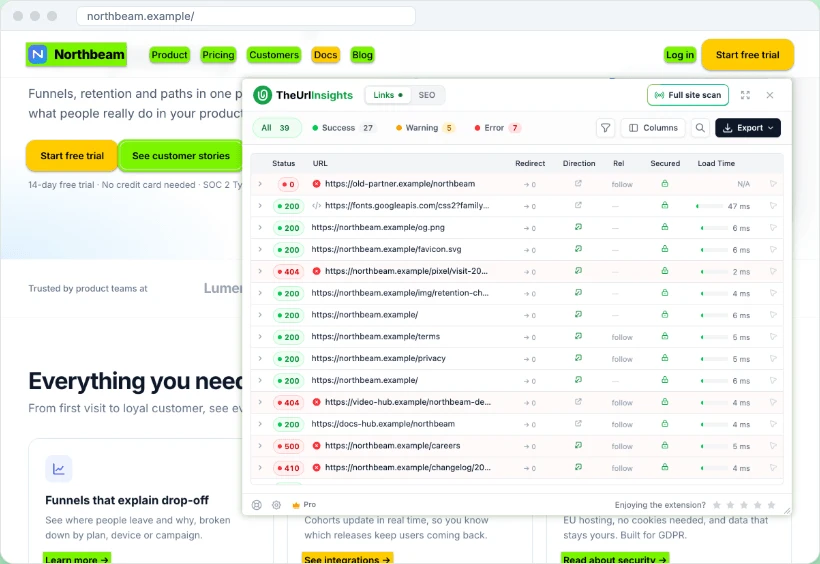
TheUrlInsights checks every link and resource on the page, including images and scripts, and shows each redirect hop by hop. It also has a Full Site Scan for the links on a whole site.
On-page SEO checks with explanations
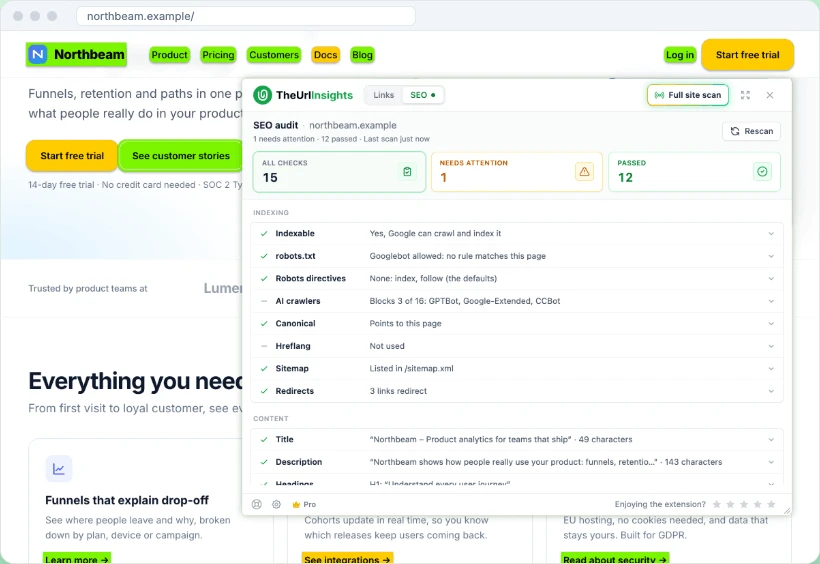
TheUrlInsights' SEO tab runs 15 checks, from indexing to social tags, and says why each finding matters. SEOquake has an on-page audit too, covering mobile, hreflang, sitemaps, alt text and structured data, and exports to PDF and CSV.
SEO platform data beside search results
Ahrefs SEO Toolbar, SEOquake and MozBar bring their platforms' metrics into the browser. Their free features cover on-page checks. Backlinks, traffic and keyword data need an account, and much of it a paid plan; Ahrefs' paid plans start at $29 a month. MozBar's listing rating, 1.4, suggests checking recent reviews first.
Speed and page experience
Lighthouse is built into Chrome's developer tools. Google recommends the DevTools panel over the Lighthouse extension, which can't test local or signed-in pages (Chrome for Developers).
The best free SEO extensions for Chrome
All of the extensions above are free to install. The differences are in what you get without paying or signing up:
- Free, with no account: Detailed SEO Extension, META SEO inspector, SEO META in 1 CLICK, Redirect Path and Lighthouse.
- Free with a free account: TheUrlInsights (every link and SEO check), and the extra metrics in SEOquake and MozBar.
- Mostly paid: Ahrefs SEO Toolbar's data features. SEO Minion's store listing says it needs a paid Keywords Everywhere plan, though its maker's page says it's free.
For what free tools can and can't do across a whole audit, read how to check a website's SEO for free.
Before you install: permissions and privacy
Most SEO extensions ask to read the pages you visit, because that's how they check them. Read what the listing says about data. SEO Minion's listing, for example, says it collects personal and location data. Install the few you use, and remove the rest.
For how these extensions work, and what the permissions mean, see what an SEO Chrome extension is. For a side-by-side table of features, see the SEO Chrome extensions comparison.
Common questions
What are the 5 best SEO tools?
It depends on the job. A common free set is Google Search Console, PageSpeed Insights and a crawler such as Screaming Frog. Add one or two browser extensions for on-page and link checks. Paid suites such as Semrush and Ahrefs add keyword and backlink data.
Which is the best free SEO extension for Chrome?
For reading a page's tags with no account, Detailed SEO Extension and META SEO inspector are both free. For redirects, Redirect Path. For links, redirects and on-page checks together, TheUrlInsights is free with an account.
Are SEO Chrome extensions safe?
Most need permission to read the pages you visit. Install extensions from known makers, read the listing's privacy section, and remove ones you no longer use.