
SEO Audit
On-Page SEO Audit, Right in Your Browser
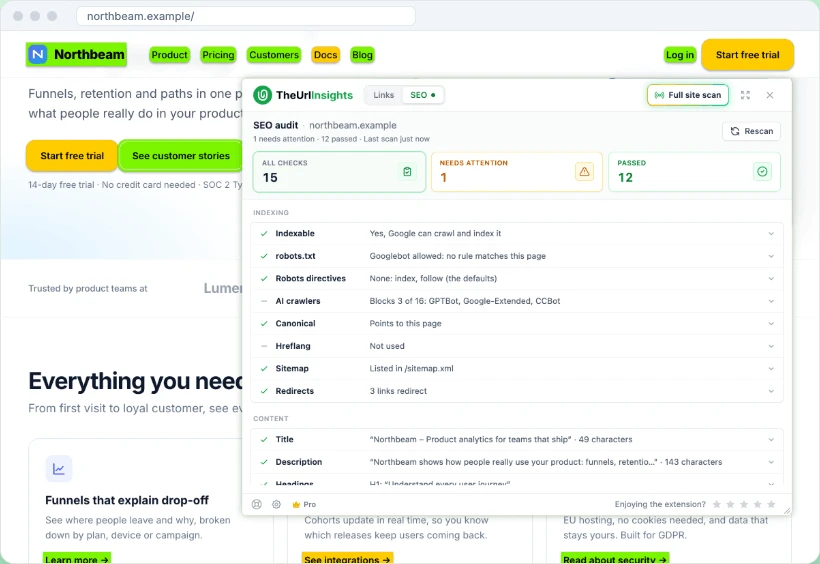
The SEO tab runs 15 checks on the page you're viewing, in three groups: Indexing, Content, and Markup & sharing. Each finding says why it matters and, for most, how to fix it.
On every plan, Free included.
Acme Outdoor · Gear for every trail
https://demo.theurlinsights.com/
3 of 14 images have no alt text
All 15 checks at a glance
Open the panel and choose SEO. The checks read the page as it is in your tab, and grade each finding.
| Group | Checks | What they answer |
|---|---|---|
| Indexing | Indexable, robots.txt, Robots directives, AI crawlers, Canonical, Hreflang, Sitemap, Redirects | Can search engines reach the page, and may they list it? |
| Content | Title, Description, Headings, Images | What a search result is built from, and whether the page is clear to read. |
| Markup & sharing | Social preview, Structured data, Page basics | How the page describes itself to social networks and to machines. |
-
Error
A real problem, such as a missing title, or a page Googlebot isn't allowed to visit.
-
Warning
Likely to cause trouble, such as a title that may be cut off, or images without alt text.
-
Info
A note for context, such as several H1 headings. The check still passes.
-
Passed
No errors or warnings. A grey dash means the check doesn't apply, such as hreflang on a single-language site.
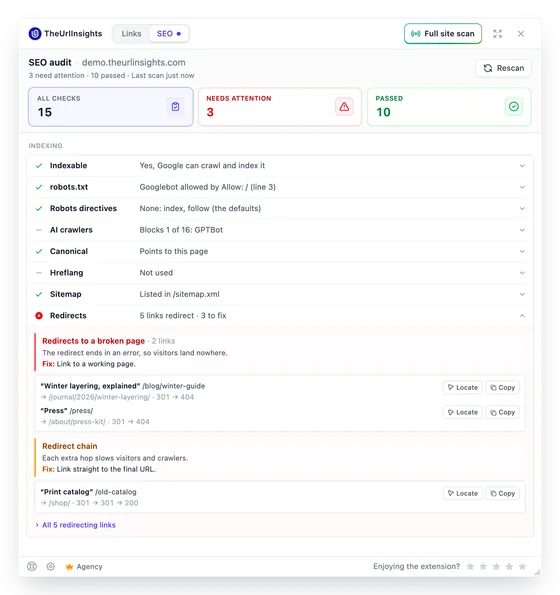
Indexing checks – noindex, robots.txt, canonical, sitemap coverage
These answer the first question: can a search engine reach the page and list it? The Indexable check reads robots.txt as Googlebot, the page's noindex and nofollow, and whether it loads without your cookies.
The Canonical check reads the address the page names as its main version, then checks that address too. The canonical tag checker explains each finding. To check whether a page can be indexed, start with noindex, X-Robots-Tag and robots.txt.
The Sitemap check looks for the page in the site's sitemaps. Hreflang covers language versions, and Redirects sums up the links that redirect. The optional AI crawlers check shows how robots.txt treats AI crawlers.
Content checks – titles, descriptions, headings, alt text
The Title check measures the <title> against 30–60 characters by
default. The Description check uses 70–160. Both flag tags that are missing, empty,
repeated on the page, or set by scripts.
You can check titles and meta descriptions in more detail, with how search results and shared links use them. Headings shows the H1–H6 outline, and warns when there's no H1.
The Images check lists every image without alt text, the short description screen readers read aloud. It can also find images missing alt text and jump to each one on the page.
Markup & sharing – structured data, language, Open Graph, Twitter cards
Social preview reads the Open Graph tags (og:title,
og:description, og:image, og:url) and
twitter:card. It flags a missing or broken image, and an
og:url that differs from the canonical.
Structured data is the code that describes a page to search engines, such as a product or an article. The check finds JSON-LD and microdata, lists the types, and flags JSON-LD that doesn't parse.
Page basics covers the page's language (<html lang>), the mobile
viewport, the character set and the favicon.
Automatic indexing checks – the toolbar icon colours explained (grey / green / orange / red)
While you're signed in, the toolbar icon runs a quick indexing check as each page loads. It reads the page, its canonical and robots.txt. Hover it for the reasons.

| Colour | Means | Set by |
|---|---|---|
| Grey | Not checked yet | The page is still loading, or you're not signed in. |
| Green | No indexing problem found | None of the signals below. |
| Orange | Possible indexing problem | robots.txt doesn't load; the page names another canonical; the canonical fails, redirects or is noindex; directives conflict or have expired. |
| Red | Can't be indexed | Blocked by robots.txt; noindex; the page fails without your browser's session. |
When to use an extension vs a full crawler
- Use the extension for the page in front of you, such as a page you're writing, a fix you just shipped, or a staging copy. It reads the page as it is after scripts run.
- Use a crawler for questions about the whole site: duplicate titles across pages, pages nothing links to, or how a crawl spends its time. The SEO tab doesn't compare pages.
- Auditing one page by hand? Follow how to audit a webpage with a Chrome extension, in the order that matters.
- TheUrlInsights has both halves for links. The broken link checker covers one page, and a Full Site Scan checks the links across a site. The scan doesn't run the SEO checks on each page.
Common questions
Does it replace Google Search Console?
No. The SEO tab checks what the page says and allows. Search Console shows what Google has actually done with it, such as whether it's indexed. Use both: fix what the checks find, then confirm in URL Inspection.
Does it check structured data validity?
Partly. It finds JSON-LD and microdata, lists the types, and flags JSON-LD that doesn't parse. It doesn't check the data against schema.org or Google's rich result rules. For that, use Google's Rich Results Test.
Does it work on staging sites?
Yes, including localhost. The checks read the page in your tab. If the staging site needs a login, checks that fetch the page without cookies will fail, and the Indexable check says so. All 15 checks are free; compare plans for Full Site Scan.
Full Site Scan
- Canonical Tag Checker Where a page's canonical points, and whether that address works. Learn more
- Noindex Checker Whether search engines may index a page: noindex, X-Robots-Tag and robots.txt. Learn more
- Full Site Scan Every page of a site checked, with a health score and PDF or CSV reports. Learn more
Check the page you're on, then the whole site
Every link and SEO check in the panel is on every plan, Free included. New accounts start with a 14-day Pro trial.