
Redirect Checker
Redirect Chain Checker for Chrome
Every link on the page you're viewing is followed to its final address. TheUrlInsights shows each redirect hop by hop, so you can see where a link really goes and how many steps it takes.
On every plan, Free included.
301 vs 302 vs 307 vs 308 – quick reference table
A redirect is the server's answer that a page is at another address, with a code that says how. Google treats permanent and temporary redirects differently, but all four reach the page.
| Code | Meaning | Keeps the request method? | Use it when |
|---|---|---|---|
| 301 | Moved Permanently | Not always: browsers may turn a POST into a GET. | A page has moved for good, such as after a site redesign or a domain change. |
| 302 | Found (temporary) | Not always, as with 301. | A move is short-lived, such as a sale page or a test. |
| 307 | Temporary Redirect | Yes. | A temporary move where a form's POST must stay a POST. When Chrome switches to HTTPS by itself, that isn't counted as a hop. |
| 308 | Permanent Redirect | Yes. | A permanent move where the method must stay the same, such as an API address. |
Why redirect chains hurt SEO and page speed
A redirect chain is a link that takes more than one redirect to reach a page. Each hop is another request, so visitors wait longer, especially on slow mobile connections.
Crawlers pay too. Every hop uses part of the time a search engine spends on your site, which SEOs call crawl budget. Google follows a limited number of hops, so a long chain may never be followed to the end.
Chains usually grow by accident. A page moves, then moves again, and each old redirect stays in place. Links in your own pages still point at the first address.
How to trace a redirect chain
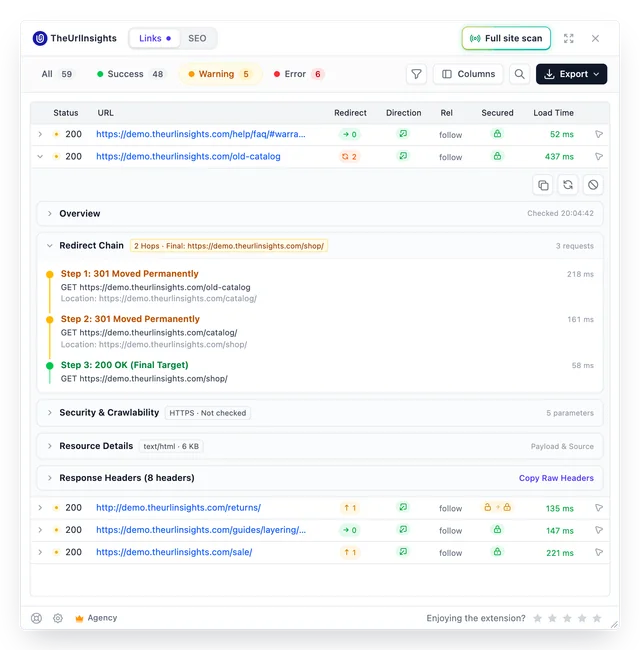
A worked example: /old-catalog → /catalog → /shop.
/old-catalog
  → 301  /catalog/
  → 301  /shop/
  ✓ 200  (Final Target)
A link in the demo shop's footer points to /old-catalog. It works,
but only after two permanent redirects: to /catalog/, then to
/shop/.
In the Links tab, the Redirect column shows 2 in orange. Opening the row shows the Redirect Chain: each step with its status, address, Location header and time.
The fix is in the link: change it to /shop/, then use
Recheck URL. It now reads Success, with no redirects. Then
point the old addresses straight at /shop/ on the server, for links
you don't control.
Reading response headers and timing
Each hop lists its method, its address and its time in milliseconds. Its
Location header is the address the server sends the browser to next.
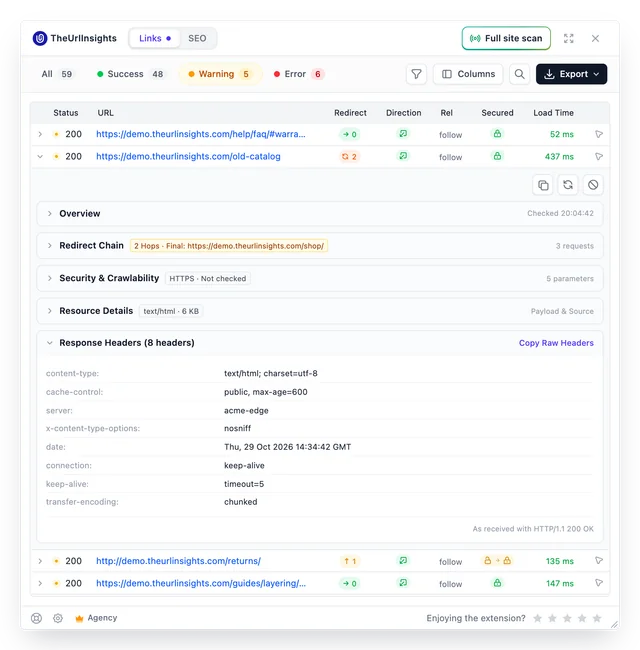
The details also show the final response's headers, such as
cache-control and content-type.
Copy Raw Headers copies them. The CSV and JSON exports include
every hop's headers, so you can compare them.
"Served from cache" marks a hop the browser answered from its own cache. That matters after you change a redirect: Recheck the link to see the new answer.
Common redirect problems
The SEO tab's Redirects check sums these up for the whole page, from the Links tab's results.
-
Redirects that end in 404
The redirect works, but the address it lands on doesn't. The link takes the final answer's status, and the SEO tab lists it under "Redirects to a broken page". The broken link checker explains each error.
-
Redirect loops
The redirects lead back on themselves and never reach a page. It's an error: the page can't load. Fix the redirect rules on the server.
-
HTTP → HTTPS → www double hops
An old
http:link is sent to HTTPS, then towww, then to the page. The Secured column flags a drop from HTTPS to HTTP as a Security Downgrade.
How to fix redirect chains
-
Find the chains
Open the Filter menu and choose Chain (2+ hops). The Redirect column turns orange for 2–3 hops and red for 4 or more.
-
Update your own links first
Change each link to the final address the chain ends on. That fixes the chain for every visitor and crawler, with no server change.
-
Shorten the server rules
For links you don't control, point each old address straight at the final one, in one permanent redirect.
-
Check the canonical too
A page's canonical should name the final address, not one that redirects. The canonical tag checker flags it when it does.
-
Recheck
Use Recheck URL on each fixed link. It should read Success, with 0 redirects.
Common questions
How many redirects is too many?
One redirect is often fine. Two or more is a chain, and the SEO tab warns about it, because each hop adds a request. Aim for links that reach the page directly.
Do redirects lose link equity?
Google says permanent and temporary redirects both pass ranking signals. The cost of a chain is speed and crawling, so updating links to the final address is still worth it.
Can I check redirects across a whole site?
Yes. A Full Site Scan checks the links on every page it reads, and its report lists redirect problems with the pages they're on. Plans differ in how many pages; see the plan limits.
Full Site Scan
- Broken Link Checker Every link and resource on the page you're viewing, with what each result means. Learn more
- Canonical Tag Checker Where a page's canonical points, and whether that address works. Learn more
- Full Site Scan Every page of a site checked, with a health score and PDF or CSV reports. Learn more
Check the page you're on, then the whole site
Every link and SEO check in the panel is on every plan, Free included. New accounts start with a 14-day Pro trial.