
Three kinds of free SEO checker
| Kind | How it works | Good for | Limits |
|---|---|---|---|
| Online checker | You enter an address; the vendor's server fetches the page | A quick report on any public page | Daily limits, often one page, a score that varies by tool |
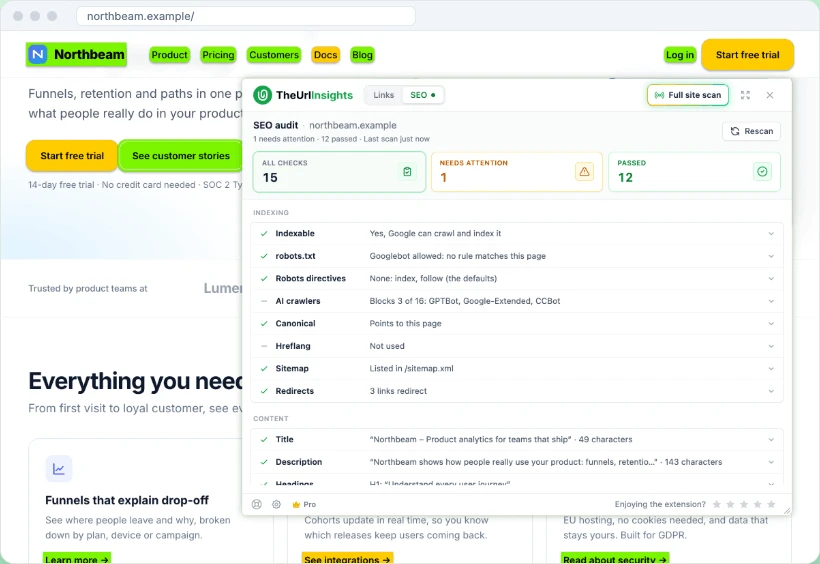
| Browser extension | Reads the page in your tab, as it loaded | Live checks, staging pages, links and redirects | Usually one page; a site scan where offered |
| Google's tools | Google's own data about your site | What Google indexed, real-visit speed data | Search Console needs you to own the site; quotas apply |
What you can check without paying
- Titles, descriptions, headings and alt text on any page.
- Broken links, redirects and failing resources on a page, and across a small site.
- Whether a page can be indexed: robots.txt, noindex and the canonical.
- Speed and Core Web Vitals, in PageSpeed Insights.
- Structured data, in the Rich Results Test.
- Which pages Google indexed, and why others weren't, in Search Console.
Where free tools stop
A free check tells you a tag exists, not whether it's good. Lighthouse's meta description audit, for example, only checks that one is present and not empty (Chrome for Developers).
Free tiers also cap volume: Semrush's free plan allows 10 reports a day, and Screaming Frog's free crawl stops at 500 URLs. And no free checker can tell you about keywords you could rank for, or your backlinks, in any depth.
Which free tool answers which question
| Question | Free tool |
|---|---|
| Is this page's SEO set up properly? | A browser extension's on-page checks, such as the on-page SEO audit |
| Are there broken links on my site? | A site scan, such as Full Site Scan, or a crawler's free tier |
| Why isn't this page in Google? | URL Inspection in Search Console |
| Is my page fast enough? | PageSpeed Insights |
For a complete free audit, see how to audit a website for free. To pick an extension, see the best SEO Chrome extensions.
Common questions
Which SEO tool is free?
Google Search Console, PageSpeed Insights, the Rich Results Test and Lighthouse are free. Many browser extensions are free too, and SEO platforms such as Semrush and Ahrefs have limited free plans.
Are free SEO checkers accurate?
For whether a tag exists or a link works, usually yes. Their scores are less useful: each tool weighs checks differently, so the same page scores differently in each.