
The whole page, in one example
<!doctype html>
<html lang="en">
<head>
  <meta charset="utf-8">
  <meta name="viewport" content="width=device-width, initial-scale=1">
  <title>Lightweight Tents for Two – Acme Outdoor</title>
  <meta name="description" content="Light two-person tents that pitch in five minutes.">
  <link rel="canonical" href="https://www.example.com/shop/tents/">
  <link rel="alternate" hreflang="de" href="https://www.example.com/de/shop/zelte/">
  <script type="application/ld+json">
    {"@context": "https://schema.org", "@type": "Product", "name": "Trail Tent 2"}
  </script>
</head>
<body>
  <header><nav><a href="/shop/">Shop</a> <a href="/guides/">Guides</a></nav></header>
  <main>
    <h1>Lightweight tents for two</h1>
    <img src="/images/trail-tent-2.webp" alt="Green two-person tent pitched on a grassy campsite" width="800" height="600">
    <h2>How to choose</h2>
    <p>Read our <a href="/guides/choosing-a-tent/">guide to choosing a tent</a>.</p>
  </main>
</body>
</html>
In the head
-
<title>: unique to the page, clear and concise. It's often the headline in search results (title links). - Meta description: a short summary that may be shown under the headline.
- Canonical: the main address when the same content is reachable at several (canonicalisation).
-
Robots meta tag: only needed to change the default, for example
noindexto keep a page out of search (robots meta tag). - hreflang: links to the page's versions in other languages; each version should link back (localised versions).
- Structured data: JSON-LD that describes the page, such as a product or an article (structured data).
-
langand viewport: the page's language, and a layout that works on phones.
In the body
-
One clear
<h1>that says what the page is about, then headings that structure the content. Google says the order of heading levels matters less than people think. -
Links as
<a href>. Google can follow links with anhref; links built only with JavaScript click handlers may not be followed (crawlable links). Descriptive link text helps readers and search engines. -
Images with
alt,widthandheight. Alt text describes the image; the size stops the layout jumping as it loads. -
Meaningful elements:
<header>,<nav>,<main>and<article>tell browsers and assistive technology what each part is.
Check what you wrote
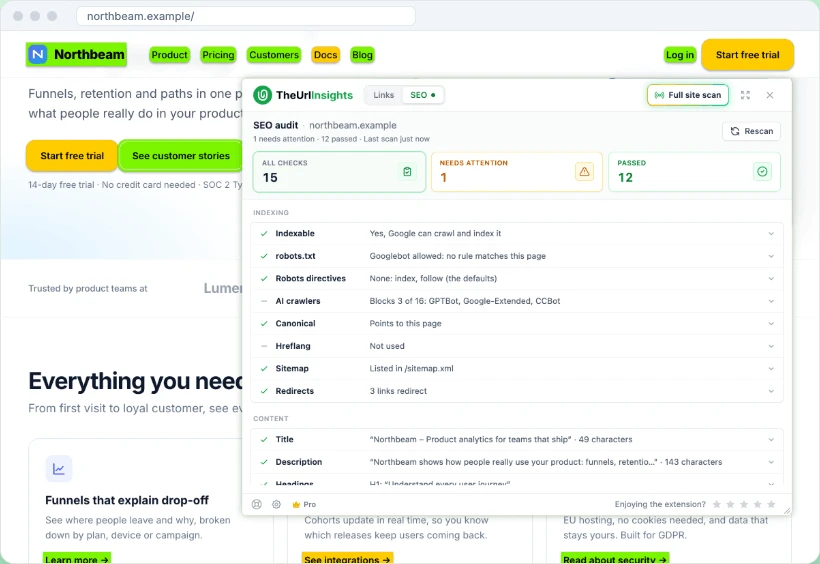
HTML that looks right can still be wrong in the browser: a script may change the title, or a canonical may point at a redirect. Open the page and check it with an extension. TheUrlInsights reads the page after scripts ran, and flags tags that scripts changed.
What HTML can't do
Clean HTML helps search engines understand a page; it doesn't make the page rank on its own. Content that answers the searcher's question, and links from other sites, matter more. Google's SEO Starter Guide notes that changes can take from hours to months to show.
To check these tags on any page, see how to check SEO meta tags in Chrome. For what else to do yourself, read can you do SEO yourself.
Common questions
How do I do SEO in HTML?
Give each page a unique title and meta description, one clear H1, a canonical where needed, alt text on images, and real <a href> links. Add structured data and hreflang where they apply, then check the page in a browser.