
Download the sample report
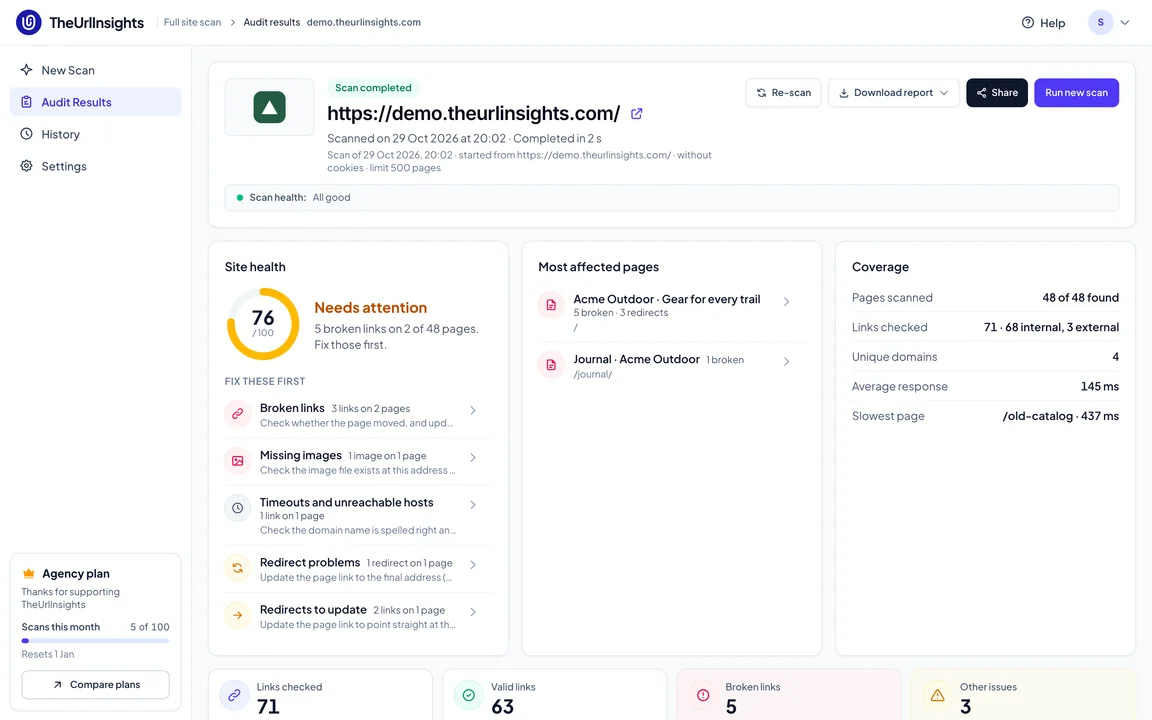
This is the Summary report (PDF) of a 48-page demo site, made by TheUrlInsights' Full Site Scan. The site, a demo outdoor shop, scored 76 out of 100: "9 broken links on 3 of 48 pages. Fix those first."
Website audit report sample (PDF)
Summary report of a 48-page demo scan · 4 pages
What a useful report includes
1. A summary a busy person can read
One paragraph and a few numbers: how many pages were checked, the overall health, and the two or three things to fix first. In the sample, that's the health score and its sentence.
2. Coverage: what was and wasn't checked
How many pages were read, whether a page limit was reached, and what was left out on purpose, such as cart and account pages. Without this, the reader can't tell a clean result from an incomplete one.
3. Findings, with evidence
Each finding names the page, the problem and the proof: the status code, the redirect hops or the tag that was found. "Broken link on /shop: /shop/trail-shoes answers 404" is something a developer can act on. "Some links are broken" isn't.
4. Priority and impact
Group findings by how much they matter and how hard they are to fix. Indexing problems on key pages and broken links in the main menu usually come first. Be realistic: Google warns against anyone who promises rankings (Google Search Central).
5. How to fix, and how to check the fix
A short fix for each group, and how to confirm it worked, such as "re-scan and check the link answers 200". This turns the report into a work plan.
What the sample shows, and what it doesn't
The sample covers links and resources across the site: broken links, redirects and slow pages. It doesn't cover on-page SEO for every page, speed metrics or content quality. A full audit adds those from other checks, as in how to audit a website step by step.